Hi,
I’ve just bought two B2 bulbs for a specific purpose that means I have to be able to adjust the colour temperate to specific values. The app only shows me a colour wheel with no measurement in Kelvin, how can I input specific Kelvin values and also see what the current temperature is in Kelvins please?
Thanks!
Edited to add: one of the bulbs is faulty so I will have to return them, but I’d like to know about this so I can decide whether to replace them with the same product or not. If the above isn’t possible, I’d like to know if you have any other E27 bulbs that you can set by Kelvin that also have a CRI of at least 90 and ideally a decent R9 rating.
Dear User,
Thank you for reaching out.
We apologize that our light bulbs does not support adjusting the colour temperate to specific values; colors and color temperature can be adjusted in the color wheel. We will forward your feedback regarding this to our team for future improvements.
Regarding the faulty bulb, we are very sorry for the inconvenience. Please contact our after-sales support team at cs@lepro.com with your order number, and we will gladly assist you.
Please feel free to contact us if you have any questions.
Best regards,
Lepro Customer Service Team
Dear Lucinda,
Thank you for passing on the feedback and for getting back to me so quickly. It would be great if this could be implemented via the app for existing devices. In the meantime I have discovered some more things that I think you should be aware of:
- I found Google can theoretically set a specific temperature in Kelvins via voice command (and intermittently via the text commands in the AI section of the Lepro app).
- However, whilst the light will respond to these commands, testing the colour temperature with a light meter shows that the temperature doesn’t match the requested value, rendering this method not fit for purpose.
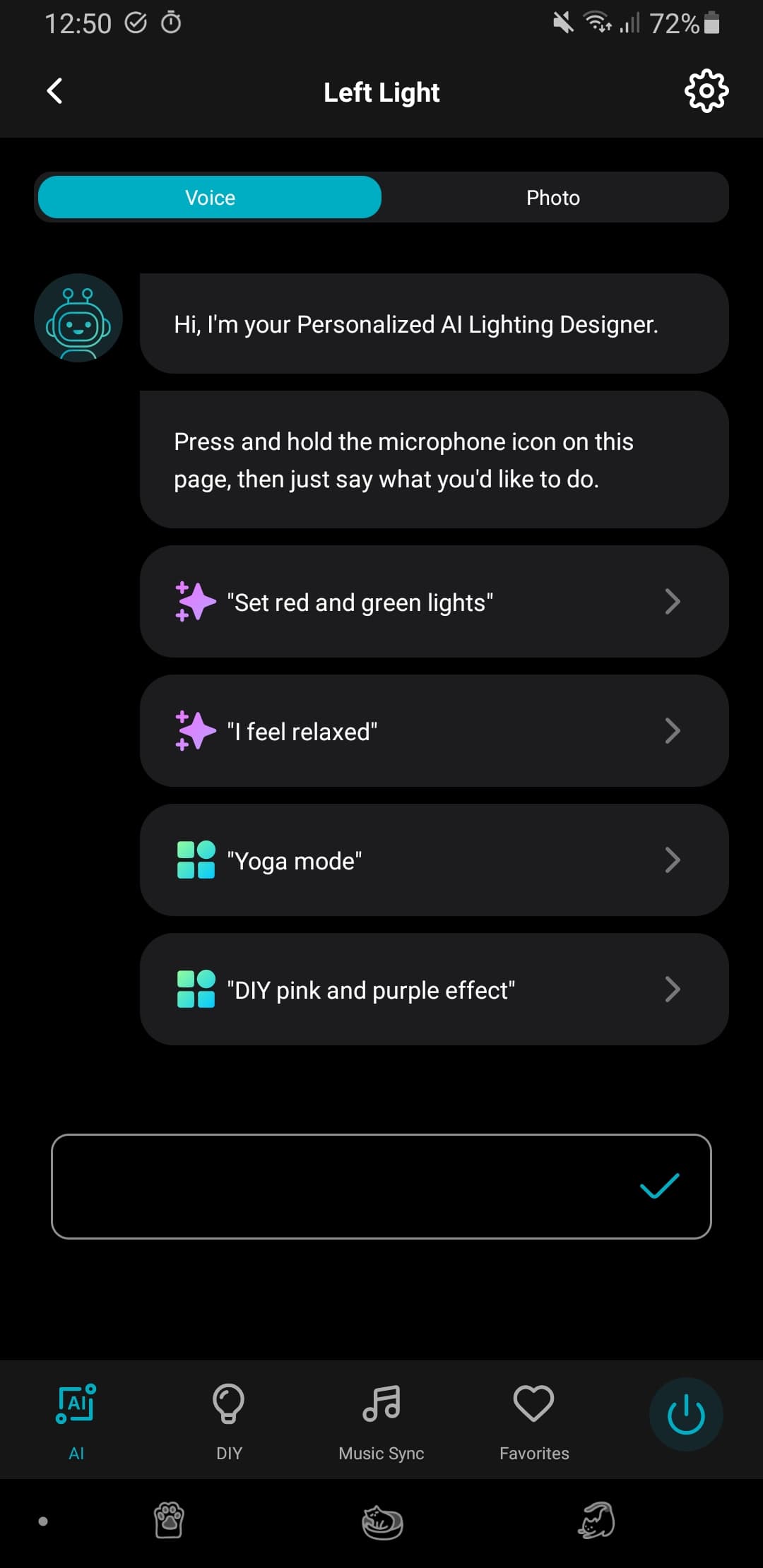
- I assume using voice commands in the Lepro app would be the same, but I can’t test it as my app doesn’t have a microphone button (see attached).
- The only workaround I’ve found so far is to guess at the desired colour temp using the wheel, save it as a rule, and then check the actual temperature with a light meter afterwards. This is laborious especially if you don’t correctly guess where on the wheel to select, meaning you have to keep repeating the process until you get it right.
- Lastly, I’ve realised that this method also saves the brightness the bulb was set to as part of the rule, even though it’s meant to just be a colour rule. So this means if I have the bulb at say 25% brightness and I want to use one of my saved rules to change the colour temperature, it will also change the brightness to 100% at the same time, as it was at 100% when I created the colour rules. Obviously this isn’t very comfortable on the eyes!
- Even if I were to delete all the rules I’ve created so far and set them all to have a much lower brightness level, this would still be really unhelpful as it would mean that every time I wanted to adjust the temperature using a rule I’d then have to go back and adjust the brightness back to where it was before.
- So overall it would be so much more helpful if in addition to the wheel there was a slider with measurements in Kelvin on it, but the measurements would need to be accurate as well.
- For rules, it would be great to have an option to toggle on and off which elements of the current lighting setup are being saved, so one can decide whether they want to combine multiple elements into one rule or not.
Re. the faulty bulb: I’ve hopefully resolved it with the seller but thank you anyway!
Many thanks!
Dear User,
Thank you so much for taking the time to share such detailed and professional feedback.
We would like to address the points you raised:
- Android Microphone Button: On certain Android models, the microphone button is replaced by text input, which executes the same backend commands.
- Kelvin Accuracy & Rules Settings: We completely understand the frustration with Kelvin accuracy via third-party commands, as well as saved Rules forcing brightness changes (e.g., jumping unexpectedly to 100%). Your idea of adding toggle switches to choose which parameters to save is brilliant.
- Faulty Bulb: We are glad to hear the seller was able to resolve the issue for you.
We have submitted all your insights—including the Kelvin slider request, color accuracy tuning, and Rule parameter toggling—directly to our App & Product Development teams.
Please feel free to reach out anytime if you have further suggestions.
Best regards,
Lepro Customer Service Team
Hi Lucinda,
Thanks again for getting back to me and forwarding my feedback. I just wanted to clarify that using the Lepro app text prompt to set a specific colour temperature also results in an inaccurate result, so it’s not just a third-party issue.
Thanks!