I tried to doit with Rules, but doesn’t let me to select a device group, just a device, so I would like to turn on and off the group using a schedule
Dear user,
We sincerely apologize for any inconvenience this issue may have caused and appreciate your feedback, which we have forwarded to our team to help improve our app.
Currently, there are two methods to schedule your lights to turn on and off at specific times:
Method 1:
You can create a schedule through "Rules" to turn multiple devices on or off at a specific time. However, as you mentioned, you will need to select the action for each device individually (not as a group). When you select "Turn on", the light will turn on with the last used colors; if you select "Color", it will turn on with the exact color you selected.
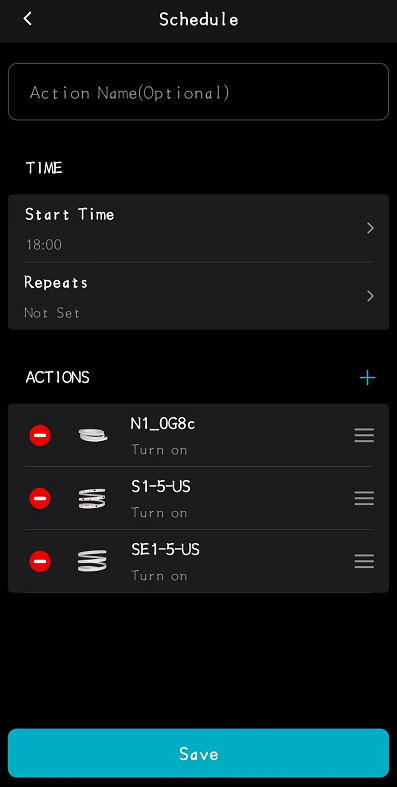
Method 2:
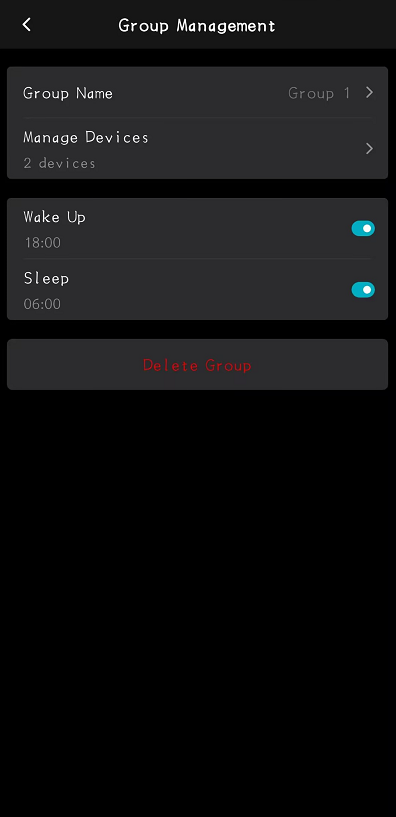
After selecting the group, click the settings button in the top right corner to configure the "Wake Up" and "Sleep" options. This will allow all lights in the group to turn on or off gradually at the specified times. Please note that the "Wake Up" and "Sleep" functions have preset colors that cannot be changed.
Please feel free to reach out if you have any questions.
Best regards,
Lepro Customer Service Team
Thank you, but before I sent my question I already tested both methods, I have a lot of lights to control and I would like to use a massive action like the group\schedule function in the old app.
Honestly I don’t understand why You didn’t replicate that function.
Dear user,
We apologize that the app function did not meet your expectations. Your feedback has been forwarded to our technical team for future improvement.
If you have any questions or need further assistance, please feel free to reach out.
Best regards,
Lepro Customer Service Team